Showing posts with label finances; financial advice. Show all posts

Wednesday, October 21, 2015

Want to build your family wealth? Build your home equity...


Family Wealth Grows as Home Equity Builds | Keeping Current Matters
With residential real estate values rising quite substantially in most parts of the country over the last few years, many homeowners are seeing a major increase in their family’s wealth as equity continues to build in their house.
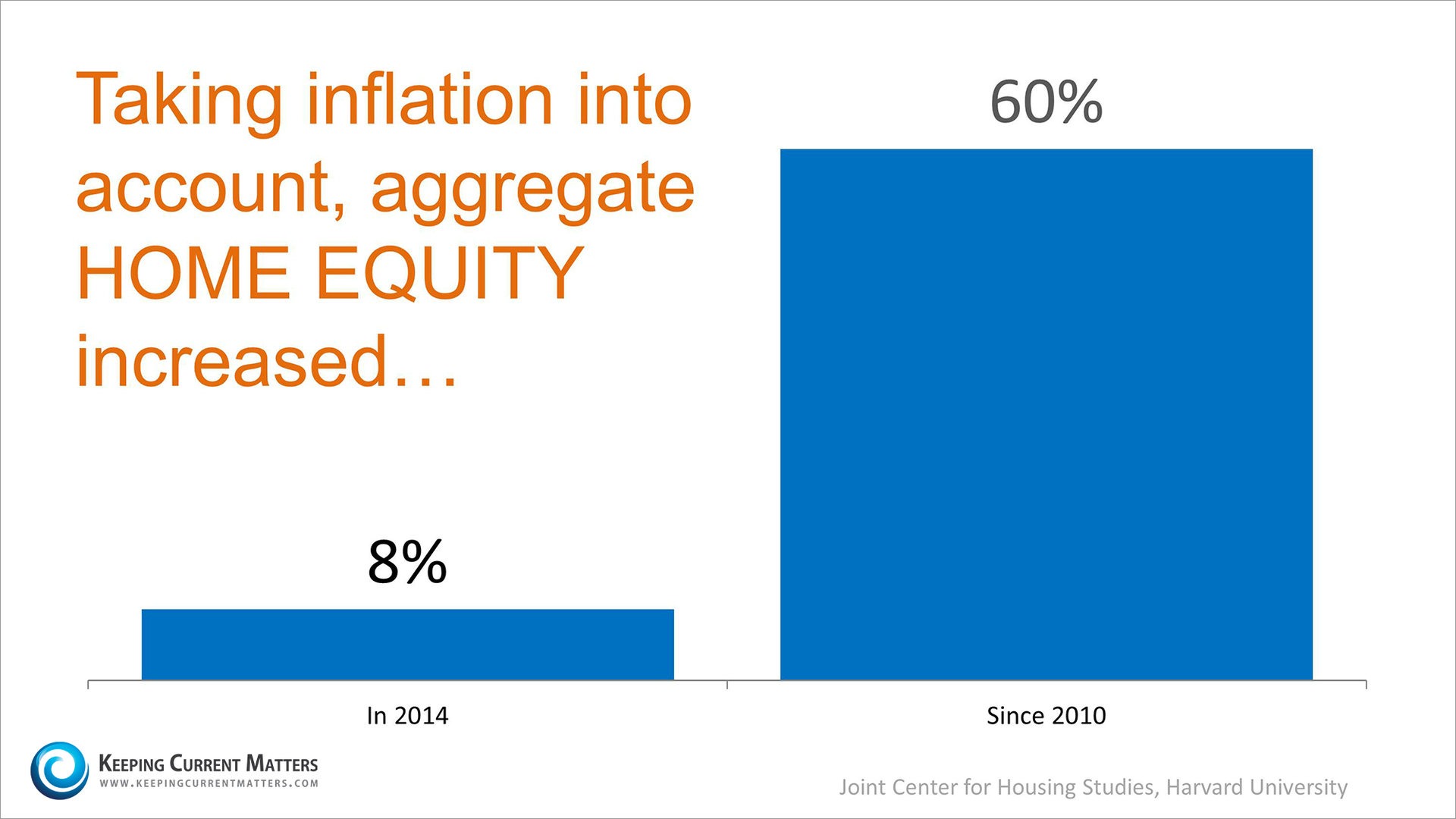
A recent study by the Joint Center of Housing Studies at Harvard University revealed that home equity grew nicely last year and has grown dramatically over the last five years…
Inflation & Home Equity | Keeping Current Matters
Buyers looking today may not see the same build-up in equity but could still do quite well.
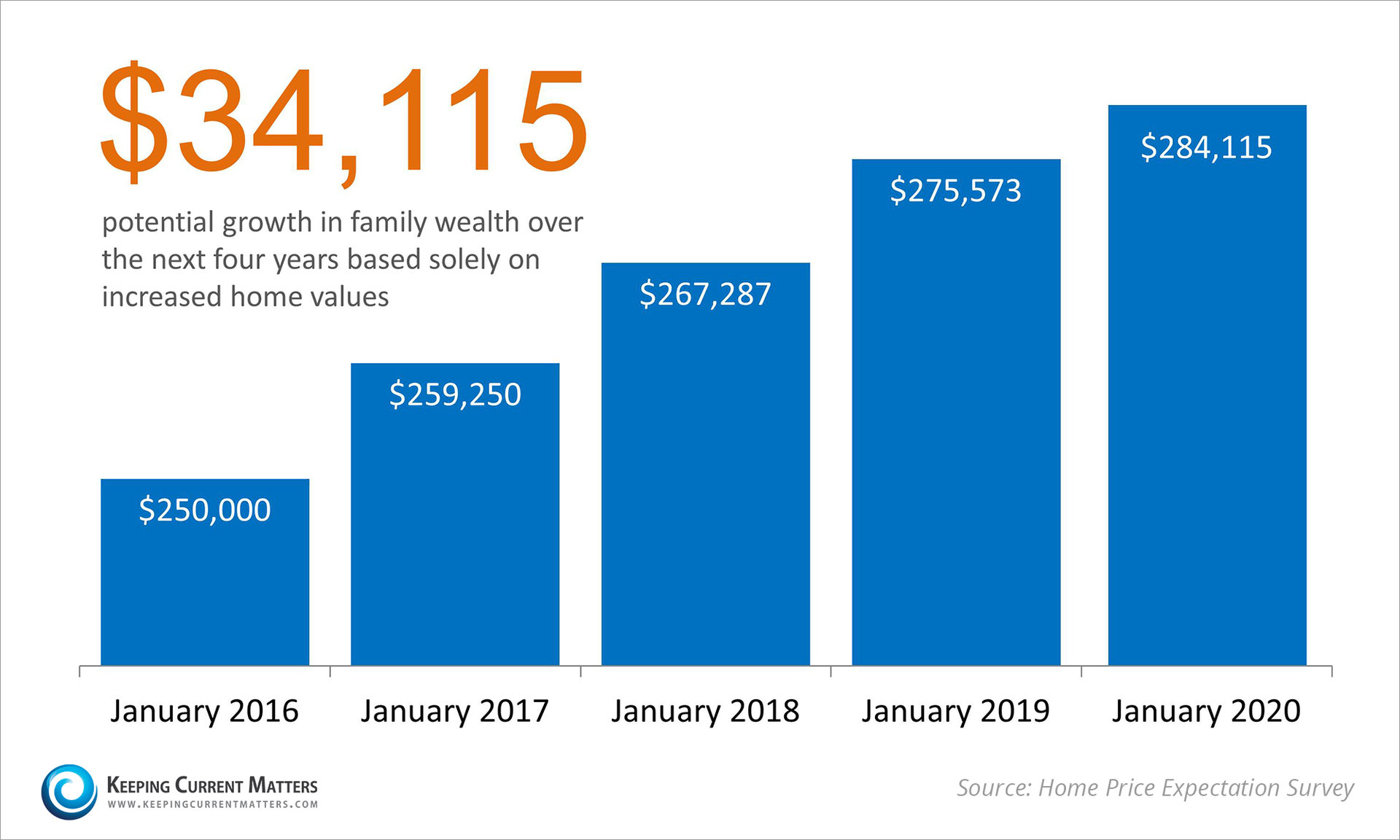
Let’s assume you went into contract in the next six weeks and closed on a $250,000 home in January. If we take the house value projections from the last Home Price Expectation Survey, here is how your equity would grow over the next four years:
Home Price Expectation Survey Equity | Keeping Current Matters

Bottom Line

Homeownership has historically been a great way for the average American family to build wealth over time.

Tuesday, July 21, 2015

Need a reason to buy a home, instead of renting one?

  Check out these Keeping Current Matters statistics...

Stop Paying Your Landlord's Mortgage | Keeping Current Matters
There are some people that have not purchased a home because they are uncomfortable taking on the obligation of a mortgage. Everyone should realize that, unless you are living with your parents rent free, you are paying a mortgage - either your mortgage or your landlord’s.
As The Joint Center for Housing Studies at Harvard University explains:
“Households must consume housing whether they own or rent. Not even accounting for more favorable tax treatment of owning, homeowners pay debt service to pay down their own principal while households that rent pay down the principal of a landlord plus a rate of return.  
That’s yet another reason owning often does—as Americans intuit—end up making more financial sense than renting.”
Christina Boyle, a Senior Vice President, Head of Single-Family Sales & Relationship Management at Freddie Mac, explains another benefit of securing a mortgage vs. paying rent:
“With a 30-year fixed rate mortgage, you’ll have the certainty & stability of knowing what your mortgage payment will be for the next 30 years – unlike rents which will continue to rise over the next three decades.”
As an owner, your mortgage payment is a form of ‘forced savings’ which allows you to have equity in your home that you can tap into later in life. As a renter, you guarantee the landlord is the person with that equity.
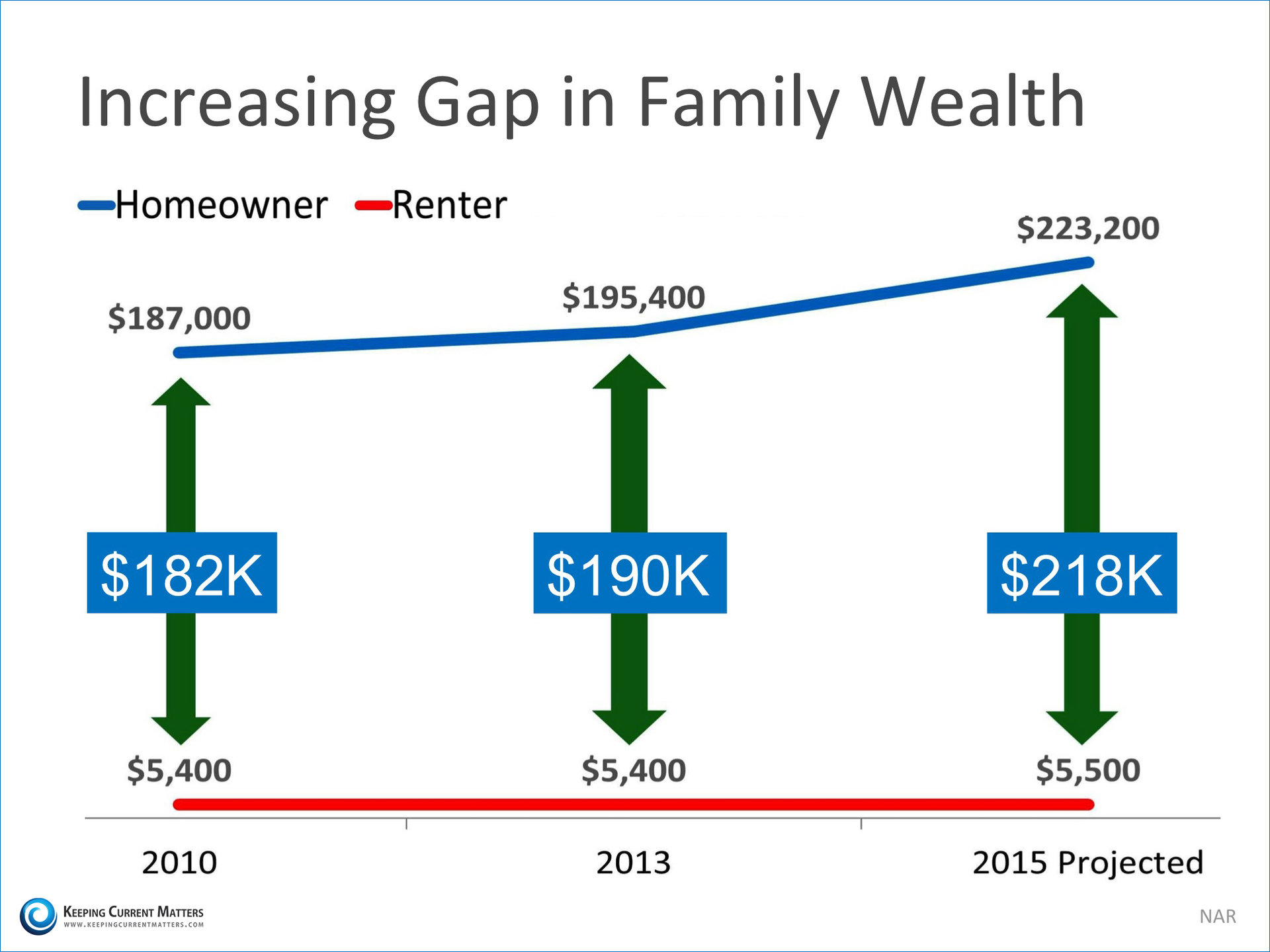
The graph below shows the widening gap in net worth between a homeowner and a renter:
Increasing Gap in Family Wealth | Keeping Current Matters

Bottom Line

Whether you are looking for a primary residence for the first time or are considering a vacation home on the shore, owning might make more sense than renting since home values and interest rates are projected to climb.

Wednesday, December 31, 2014

Cyber-Security Expert Offers 10 Tips to Safeguard Your Information


Cyber-Security Expert Offers 10 Tips to Safeguard Your Information
By Gary S. Miliefsky

We’ve all lost our identity at least three times, with more than 930 million records breached, lost or stolen to hackers and cyber criminals, says consumer advocacy non-profit Privacy Rights Clearinghouse.

Why don’t we do all we can to stay safer online?

According to StaySafeOnline.org, more than a quarter of Americans say they lack the information necessary.

So, here it is – everything you need to know to enjoy the shopping experience without losing your privacy and identity or putting your children’s safety at risk:
  • Assume you’ve already been compromised. Whether it's your baby monitor, your SmartTV, the Webcam on your laptop or apps you installed on your smartphone or tablet, your antivirus is not enough protection. It's time to take those devices’ and apps’ privacy policies, and the permissions you grant them, much more seriously.
  • Change your passwords – all of them. Now. And do it as frequently as you can tolerate. Also, if you don't want to change it often, then use any unique characters you can think of, such as a dollar sign ($) or exclamation mark (!), or replace an "oh" with a "zero" (0). This goes a long way in preventing attacks against your password.
  • Turn off wireless and geolocation services. Protect your smartphones and tablets by turning off WiFi, Bluetooth, NFC and GPS, except when you need them. That way, if you are at a local coffee shop or in a shopping mall, no one can spy on you using nearby (proximity) hacking attacks and they can’t track where you were and where you are going on your GPS.
  • Assume most of your apps are creepware. Do you really need them? Delete all of the apps you aren't using too often. Replace apps that ask for too many permissions and take advantage of too many of your privacy settings -- like GPS, phone and sms logs, personal identity information – with similar apps that don't.
  • Opt out of sharing your information. Opt out of every advertising network that you can. Visit the National Do Not Call Registry and register your smartphone and home phone numbers at www.donotcall.gov. If you use a Google email account and have an Android phone, even with your GPS off, it's tracking your every move. (Log in to maps.google.com/locationhistory/b/0 and see for yourself.) Go into your smartphone or tablet settings and turn this feature off. In your Android phone, go to Settings, then Location, select Google Location Reporting and set Location History to off. The same holds true for the Apple iPhone, iPad and iTunes. You need to find the location and privacy settings and turn off access under Settings, then Privacy then Location.
  • Your browser is a double agent – keep it clean. It is spying on you for advertisers unless you block and remove cookies and delete the cache frequently. In your web browser settings, delete your history, all cookies and passwords and the cache. You should do this frequently so you don't leave personal information sitting around on your computer, smartphone or tablet.
  • Remove third-party Facebook plugins. Third-party plugins are mini applications designed to eavesdrop on your behavior in Facebook and possibly grab information about your habits within that social network. Some websites you visit will require you to log in using Facebook, and then you have to trust them to connect to your Facebook account. This is very risky. Read their privacy policy and make sure they are a legitimate business before you risk doing this.
  • Only shop on the websites of companies you already trust. If you don't know where the merchant is located, don't shop online there. If they don't have a corporate address or are located in another country, it is risky for you and you may never see the goods you think you purchased. Also, if their shopping cart experience is not an HTTPS browser session, then everything you type in, your name, address and credit card information, is going over the internet unencrypted -- in plain view.
  • Turn off geotagging – your photos are full of information. Twitter and Instagram as well as your iPhone will give away your location. Most peopleĆ¢€¨don't realize Twitter and Instagram both use geotagging for everything you send out. Geotagging stores the latitude and longitude of your tweet or image. Pictures you take on an iPhone usually store geotagging information, as well. The less information you give out about where you are located, the safer you are.
  • Don’t use cash or debit cards – use credit cards, wisely. Credit cards allow you to travel with less cash, and if you’re purchasing online, it's safer to give your credit card than your debit card information. The same holds true when you visit your local retail outlet. The reason? If you experience identity theft, credit card laws allow you to keep all of your credit, with no responsibility during an investigation. With a debit card, your bank can tie up your money in the amount equivalent to the fraudulent transactions for up to 30 days.
http://rrein.rismedia.com/tracking/content_track/user_id:50769/article_id:71230/method:img
Reprinted with permission from RISMedia. ©2014. All rights reserved.
12/31/2014